需求描述
在uniapp开发的H5项目中,需要通过百度统计代码将用户的操作信息进行记录统计。
1.新建 count.html 文件
将文件放置在项目根目录下,文件名称自己随意。
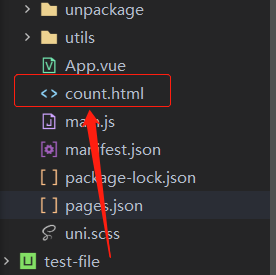
2.百度统计代码
打开刚刚生成的 count.html 文件,将以下代码复制粘贴进出。注意填写自己获取的百度统计码。
统计码如何获取? 百度账号登录:https://tongji.baidu.com/sc-web 查看相关信息
1
2
3
4
5
6
7
8
9
10
11
12
13
14
15
16
17
18
19
20
21
22
23
24
25
26
27
28
29
30
31
| <!DOCTYPE html>
<html lang="zh-CN">
<head>
<meta charset="utf-8">
<meta http-equiv="X-UA-Compatible" content="IE=edge">
<meta name="viewport" content="width=device-width, user-scalable=no, initial-scale=1.0, maximum-scale=1.0, minimum-scale=1.0">
<title>
<%= htmlWebpackPlugin.options.title %>
</title>
<script>
document.addEventListener('DOMContentLoaded', function() {
document.documentElement.style.fontSize = document.documentElement.clientWidth / 20 + 'px'
})
var _hmt = _hmt || [];
(function() {
var hm = document.createElement("script");
hm.src = "https://hm.baidu.com/hm.js?此处填写你获取的百度统计码";
var s = document.getElementsByTagName("script")[0];
s.parentNode.insertBefore(hm, s);
})();
</script>
<link rel="stylesheet" href="<%= BASE_URL %>static/index.css" />
</head>
<body>
<noscript>
<strong>Please enable JavaScript to continue.</strong>
</noscript>
<div id="app"></div>
</body>
</html>
|
3.设置项目配置
在根目录下找到 manifest.json → 源码视图 → h5 配置项,添加属性 template 。
1
2
3
4
5
6
| "h5":{
"publicPath" : "",
"title" : "xxxx",
"template":"count.html",
"devServer" : {}
}
|